

How Do I Know Which Jobs Made Money Last Month?
Quick answer
You know which jobs made money by job costing: putting every bill, purchase and labor hour on the job it was spent on, then comparing each job's costs with what you charged. QuickBooks Online (Plus or Advanced) and Xero (with Projects) can both do it. The first setup takes about an hour.
The full answer
Your company can have a good month and still lose money on some jobs. The bank balance went up, the crew stayed busy, and the profit and loss statement looks fine. But a P&L shows the whole company at once. It can't tell you that the Johnson repaint quietly ate its profit while the next three jobs carried it.
What is job costing?
Job costing means every cost lands on the job it was spent on: materials, subcontractors, equipment rentals, permits and labor hours. When the job is done, you compare its total cost with what you invoiced. The difference is that job's profit.
Without it, all those costs sit together in one pile. You know what the company spent last month, but not which jobs it spent it on.
What does job costing show that a P&L doesn't?
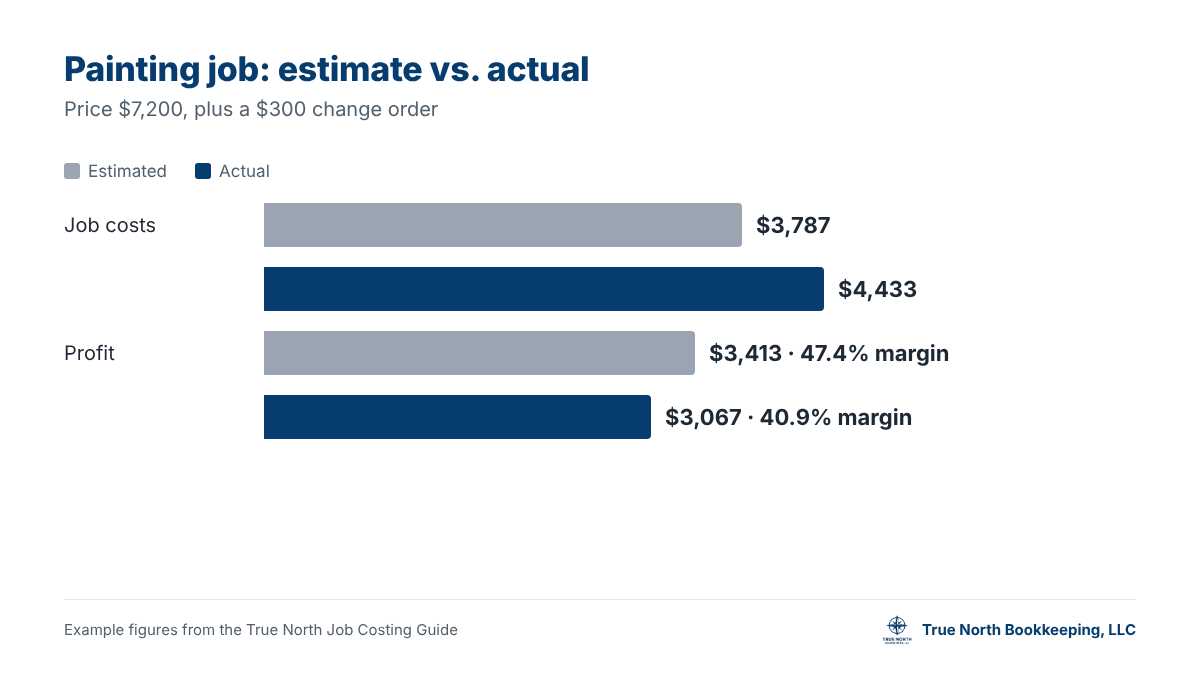
Here's an example from a painting company. The job was quoted at $7,200, with a $300 change order added along the way.
| Estimated | Actual | |
|---|---|---|
| Price (with change order) | $7,200 | $7,500 |
| Job costs | $3,787 | $4,433 |
| Profit | $3,413 | $3,067 |
| Margin | 47.4% | 40.9% |
The crew ran 18 hours over the estimate. Even with the change order, the job made $346 less than planned. Nothing on the P&L would have flagged it; the month still looked good. Job costing caught it, and it pointed to the fix: the labor estimate for that kind of job was too low.
Over a season, that's how pricing gets better. You see which job types run over and adjust the next quote.
How do I set up job costing in QuickBooks Online or Xero?
The steps are similar in both programs:
- Check your plan. In QuickBooks Online, projects and classes need the Plus or Advanced plan; Simple Start and Essentials don't include them. In Xero, Projects comes with the Established plan.
- Label the kinds of work. Use classes in QuickBooks Online (for example, Service, Install, New construction) or a "Job type" tracking category in Xero, so you can compare job types.
- Make a project for each job.
- Put every cost on its job. In QuickBooks Online, pick the project on each bill and expense line. In Xero, assign each bill and purchase to the project.
- Put labor on the job. Either split payroll by job, or set an hourly cost for each worker and enter hours on the job. Use the worker's full cost, not just their wage: payroll taxes, workers' comp and benefits add a labor burden on top.
- Check the numbers. Look at each project's profitability screen when the job closes, and run a report by job type each month.
What costs do trades companies forget to put on the job?
These are the usual ones that end up in overhead instead:
- Materials pulled from truck stock or the shop
- Equipment rentals and dump fees
- Permits and inspection fees
- Drive time and return trips for callbacks
- Subcontractors billed after the job closes
Each one missed makes a job look more profitable than it was. A quick weekly check (does every bill from this week have a job on it?) catches most of them.
How often should I check job profit?
Weekly for jobs in progress, monthly for the whole picture. During a job, a quick weekly look at hours and costs against the estimate lets you catch an overrun while there's still time to talk with the customer about a change order. At month end, look at profit by job type: service, install, new construction. That's where patterns show up, like installs that always run over on labor, or a type of work that keeps the crew busy but barely makes money. Those patterns are what change your next quote.
Do I need software to start?
No. If your plan doesn't include projects yet, or you want to try it on a few jobs first, a spreadsheet works. Track the estimate and the actual for each line, then compare when the job is done. Once you've seen what it shows, moving it into your books is the next step.
What to do this week
- Pick one job starting this week and track every cost and hour on it, start to finish.
- Check which plan your accounting software is on.
- Write down the 3 or 4 job types you'd most like to compare.
How True North helps
True North Bookkeeping sets up and runs job costing for trades companies in QuickBooks Online and Xero, and sends you a plain-English report each month showing your profit job by job. Books are closed and reconciled by the 15th of the following month, as long as questions are answered and documents sent on time.
Get the free Job Costing Guide for QuickBooks Online or Xero, with every setup step and this painting example worked through. Or get the free Job Cost Worksheet: an Excel file that compares estimate and actual on every job, line by line, with a tab for each trade. Questions? Text Stephen at 623-738-5406.
Sources: QuickBooks Online and Xero plan features as listed in Intuit's and Xero's help articles (checked October 31, 2026).